We recently released new services: rotating open proxy (unstable public proxies) and rotating premium proxy (stable premium proxies). They aim to make it easier for scripts to switch IPs while doing scraping tasks.
Regular Proxy
When using regular proxies, your scripts need to do these things to use different IPs to scrape web pages.
- Get a proxy list from your proxy provider via an API (example).
- Use a proxy from the list to scrape web pages.
- Change to another proxy to avoid that IP being blocked.
- After a while (one hour), get a new proxy list (Step 1).
Rotating Proxy
When using our rotating proxy service, your script needs only one proxy to do the jobs. It doesn’t need to download a proxy list and change proxies. We rotate the IPs for you.

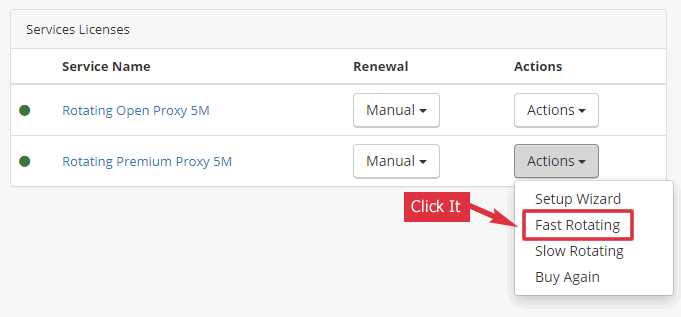
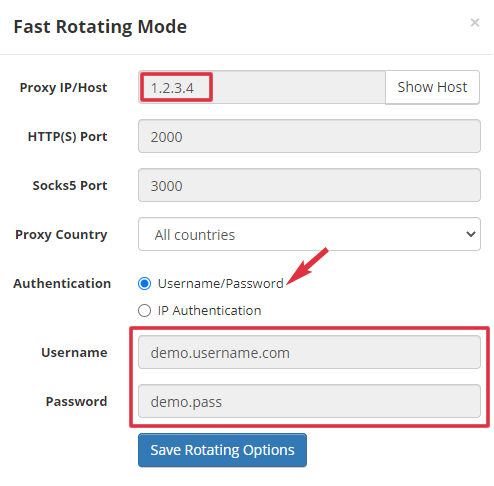
Use the Proxy
Our rotating proxy supports both HTTP(S) and SOCKS5. If you use IP authentication, no username/password is required.
Sample Scripts
Here are some sample scripts showing how to use our rotating proxy as an HTTP(S) proxy with username/password authentication.
In the code, we use gate.proxy.com as the demo proxy host. You should use the real proxy host or IP in your script.
We use http://ifconfig.co for testing. It returns the visitor’s IP. You should see a new IP every time you use our rotating proxy to access it.
# https://curl.haxx.se/download.html
# Change the URL to your target website
curl --proxy https://user:pass@gate.proxy.com:2000/ \
http://ifconfig.co

# Sample output
# 149.90.31.59
import requests
proxies = {
"http": "https://user:pass@gate.proxy.com:2000",
"https": "https://user:pass@gate.proxy.com:2000"
}
# Pretend to be Firefox
headers = {
'User-Agent': 'Mozilla/5.0 (Windows NT 10.0; Win64; x64; rv:87.0) Gecko/20100101 Firefox/87.0',
'Accept-Language': 'en-US,en;q=0.5'
}
# Change the URL to your target website
url = "http://ifconfig.co"
try:
r = requests.get(url, proxies=proxies, headers=headers, timeout=20)
print(r.text)
except Exception as e:
print(e)# scrapy.org - a scraping framework for Python
# 1. Enable HttpProxyMiddleware in your settings.py
DOWNLOADER_MIDDLEWARES = {
'scrapy.downloadermiddlewares.httpproxy.HttpProxyMiddleware': 1
}
# 2. Pass proxy to request via request.meta
# Change the URL to your target website
request = Request(url="http://ifconfig.co")
request.meta['proxy'] = "https://user:pass@gate.proxy.com:2000"
yield request// use https://www.npmjs.com/package/request
var request = require('request');
// Change the URL to your target website
var url = 'http://ifconfig.co';
var proxy = 'https://user:pass@gate.proxy.com:2000';
request({
url: url,
proxy: proxy
}, function (error, response, body) {
if (error) {
console.log(error);
} else {
console.log(response);
}
});<?php
// Change the URL to your target website
$url = 'http://ifconfig.co';
$proxy_ip = 'gate.proxy.com';
$proxy_port = '2000';
$userpass = 'username:password';
$ch = curl_init();
curl_setopt($ch, CURLOPT_URL, $url);
curl_setopt($ch, CURLOPT_HEADER, 0);
curl_setopt($ch, CURLOPT_RETURNTRANSFER, 1);
curl_setopt($ch, CURLOPT_PROXYPORT, $proxy_port);
curl_setopt($ch, CURLOPT_PROXYTYPE, 'HTTP');
curl_setopt($ch, CURLOPT_PROXY, $proxy_ip);
curl_setopt($ch, CURLOPT_PROXYUSERPWD, $userpass);
$data = curl_exec($ch);
curl_close($ch);
echo $data;import org.apache.http.HttpHost;
import org.apache.http.client.fluent.*;
public class Example {
public static void main(String[] args) throws Exception {
HttpHost proxy = new HttpHost("gate.proxy.com", 2000);
// Change the URL to your target website
String res = Executor.newInstance()
.auth(proxy, "username", "password")
.execute(Request.Get("http://ifconfig.co")
.viaProxy(proxy))
.returnContent().asString();
System.out.println(res);
}
}using System;
using System.Net;
class Example
{
static void Main()
{
var client = new WebClient();
client.Proxy = new WebProxy("gate.proxy.com:2000");
client.Proxy.Credentials =
new NetworkCredential("username", "password");
// Change the URL to your target website
Console.WriteLine(client.DownloadString("http://ifconfig.co"));
}
}#!/usr/bin/ruby
require 'uri'
require 'net/http'
uri = URI.parse('http://ifconfig.co')
proxy = Net::HTTP::Proxy('gate.proxy.com', 2000, 'user', 'pass')
req = Net::HTTP::Get.new(uri.path)
result = proxy.start(uri.host,uri.port) do |http|
http.request(req)
end
puts result.bodyImports System.Net
Module Example
Sub Main()
Dim Client As New WebClient
Client.Proxy = New WebProxy("https://gate.proxy.com:2000")
Client.Proxy.Credentials = _
New NetworkCredential("username", "password")
Console.WriteLine(Client.DownloadString("http://ifconfig.co"))
End Sub
End Module# https://github.com/ytdl-org/youtube-dl
youtube-dl --proxy https://user:pass@gate.proxy.com:2000/ \
https://www.youtube.com/watch?v=xxxx'use strict';
const puppeteer = require('puppeteer');
(async() => {
const browser = await puppeteer.launch({
// You need to whitelist your IP before using it
args: [ '--proxy-server=gate.proxy.com:2000' ]
});
const page = await browser.newPage();
await page.goto('http://ifconfig.co');
await browser.close();
})();If you use Selenium, here are some sample codes showing how to use our Rotating Proxy with it.